Laser Cutting and Engraving for Beginners: How to Get Started
A complete guide to desktop laser machines — understanding laser types, working with materials safely, designing files, dialling in settings, and building things with precision you cannot achieve by hand.
A laser cutter does not care about the steadiness of your hand. It cuts exactly where you tell it to, at exactly the speed and power you set, every time. That repeatability is what makes it transformative as a making tool. It does not replace creativity or design skill. It removes the gap between what you can imagine and what you can actually produce at a consistent, professional standard from a room in your own home.
What Laser Cutting and Engraving Actually Involves
A laser cutter focuses a high-powered beam of light onto a material surface with enough intensity to burn, melt, or vaporise it in a controlled path. The beam is steered by mirrors and directed by a motion system — either a gantry that moves the laser head in X and Y axes, or a galvanometer system that deflects the beam with mirrors at very high speed. The result is a machine that can cut shapes with tolerances of a fraction of a millimetre or engrave images, text, and patterns onto a surface with detail that no hand tool can match.
The two primary operations are distinct in both technique and application. Cutting passes the beam through a material completely, separating pieces. Engraving passes the beam across the surface repeatedly in a raster pattern, removing material to a controlled depth to produce texture, imagery, or lettering. Most laser projects involve both — cutting a shape to size and engraving detail onto its surface in a single job. The machine does not distinguish between these as separate modes; they are simply different combinations of power, speed, and focus.
What makes laser work genuinely creative rather than merely mechanical is the design stage. Every cut or engraved line begins as a vector path or raster image in software. Understanding how to prepare files — how to set line weights that the machine interprets as cuts versus scores, how to convert photographs into engraveable halftone patterns, how to nest shapes efficiently to minimise material waste — is a skill set that develops in parallel with machine operation and eventually becomes the larger part of the practice.
Types of Laser Machines to Explore
The most accessible entry point for beginners. Diode lasers use a semiconductor laser module mounted on an open-frame gantry system. Machines from manufacturers including xTool, Sculpfun, and Atomstack cost between $150 and $600 and produce usable results on wood, leather, acrylic, anodised aluminium, and many fabrics. They are slower and less powerful than CO2 lasers, struggle with clear or highly reflective materials, and are open-frame machines that require enclosures or eye protection protocols. The xTool D1 Pro and Sculpfun S30 Pro represent the current beginner sweet spot in this category. The workhorse of serious hobby and professional laser work. CO2 lasers use a gas-filled tube excited by electrical current to produce a more powerful, more versatile beam than diode machines. They cut thicker materials, engrave faster, and handle a wider range of materials including clear acrylic, fabric, paper, and some metals with appropriate marking compounds. The xTool P2 and the Glowforge Plus represent enclosed, beginner-accessible CO2 machines. Traditional Chinese-made CO2 machines — sold under brands including OMTech and Thunder Laser — offer larger beds and more power at lower cost with a higher learning curve for setup and calibration. Fibre lasers use a different wavelength that is absorbed efficiently by metals. They are the correct tool for marking, engraving, and cutting metal — tasks that CO2 and diode lasers cannot accomplish without special coatings. Desktop fibre lasers from brands including xTool, Monport, and Cloudray have become accessible at hobby price points in the $1,500 to $4,000 range. Their application is narrower than CO2 machines but the quality of metal marking they produce is unmatched at any price point using other technologies. Enclosed machines contain the laser beam within a protective housing, manage fumes internally, and are significantly safer and more convenient to operate in a home environment. Open-frame machines expose the work area, require eye protection whenever the laser is operating, and depend on external ventilation. Enclosed machines cost more for equivalent power but the safety and convenience advantages are significant for beginners operating without dedicated workshop space. Laser work delivers results faster than almost any other making hobby, but the early sessions involve more calibration than creation. Here is an honest picture: * **Settings will be wrong before they are right.** The power and speed settings that produce a clean cut on one batch of 3mm basswood may not cut through the next batch from the same supplier if the wood density varies. The first sessions involve running test matrices, recording results, adjusting settings, and running more tests. This is not failure — it is the calibration process every laser operator goes through with every new material. Treating it as a learning phase rather than a troubleshooting emergency produces a much better experience. * **The smell is significant and must be managed.** Laser cutting produces a quantity of smoke and fumes that is completely unacceptable in an unventilated space. The smell embeds in fabric and is persistent. Operating without proper ventilation is both a health risk and a guaranteed complaint from everyone sharing the space. Sort this before the first cut, not after. * **The first clean cut is immediately satisfying.** There is a specific quality to a piece of wood or acrylic that has been laser cut — the precision of the edge, the slight texture of an engraved surface, the cleanliness of an interior cutout — that is different from anything produced by hand tools. That quality is present from the very first successful job and is part of why people who try laser cutting tend to stay with it. * **Design takes longer than cutting.** A file that takes four hours to design and prepare runs in twenty minutes on the machine. As skills develop, the ratio improves, but the design stage is always the larger investment of creative energy. Learning vector design software in parallel with machine operation is the investment that expands what is possible more than any equipment upgrade. * **Lightburn will feel complex for the first week and then intuitive.** Lightburn is powerful software with a lot of features. The learning curve is real but the community resources are excellent — there are tutorial libraries, active forums, and a YouTube channel maintained by the Lightburn team that covers every feature in accessible detail. Most beginners report feeling comfortable with the core workflow within the first two weeks of regular use. Air assist directs a stream of compressed air at the laser focal point during cutting. It blows combustion gases away from the cut line, prevents flare-ups, keeps the lens clean, and produces noticeably cleaner cut edges by removing char before it can re-deposit on the kerf walls. Most modern machines include basic air assist. An upgraded air pump producing higher pressure improves results further on thicker materials and is one of the most cost-effective machine improvements available at $20 to $50. Engraving produces smoke residue that deposits on the surrounding material surface and is difficult to remove without damaging the finish. Applying low-tack masking tape to the surface before engraving, then peeling it off after the job, keeps the surrounding material clean and produces dramatically cleaner results with no additional effort. This technique is standard practice among experienced laser operators and is one of the most impactful workflow improvements a beginner can adopt immediately. Kerf is the width of material the laser removes as it cuts. On most hobby machines cutting 3mm wood, kerf is approximately 0.1 to 0.2mm. For decorative projects this is irrelevant. For press-fit joinery — tabs and slots that hold pieces together without glue — kerf determines whether the joint is tight, loose, or correct. Running a kerf calibration test on each material and adjusting your design's joint tolerances accordingly is the difference between joinery that fits first time and joinery that requires force or falls apart. Lasers are binary devices — the beam is either on or off at a given point. Greyscale images converted directly to laser instructions produce muddy, low-contrast results because the machine cannot reproduce true grey tones. Dithering algorithms — Jarvis, Stucki, and Floyd-Steinberg are the most widely used — convert greyscale tonal values into patterns of dots at varying densities that the eye reads as continuous tone. Lightburn includes all major dithering algorithms. Choosing the right algorithm for the material is a skill that develops through experimentation, and the results achievable on wood and leather with well-converted photographs are genuinely striking. Smoke and debris deposit on the laser lens over time. A dirty lens scatters the beam, reduces cutting power, degrades engraving quality, and if severe enough, can crack the lens from heat absorption. Cleaning the lens with a lint-free optical cloth and isopropyl alcohol every five to ten hours of cutting time maintains consistent performance and extends lens life. Checking the lens before a long job costs thirty seconds and prevents the frustration of a long run producing poor results from a cause that was entirely preventable. The Lightburn forum and the subreddits for specific machines contain documented solutions to virtually every problem a beginner encounters. The laser community online is notably collaborative — settings databases, material test results, design files, and troubleshooting guides are shared freely. Makers Muse, Laser Everything, and Russ Sadler's channel on YouTube cover technique and machine modification at a level of depth that significantly accelerates understanding of how the equipment actually works and how to get the most from it. Cutting passes the laser through the material completely to separate pieces. Engraving passes the laser across the surface to remove material to a shallow depth, producing texture, imagery, or lettering. Every laser machine does both — the distinction is purely one of settings. Cutting uses slower speeds and higher power to penetrate the material fully. Engraving uses faster speeds and lower power to remove only the surface. In Lightburn, cut lines are typically assigned as vector paths and engraving regions as filled shapes or raster images, and the software sends each to the machine with the appropriate settings. CO2 lasers can mark metal using a coating compound called Cermark or LaserBond, which bonds to the metal surface under laser heat to produce a permanent black mark. Without such a coating, CO2 lasers cannot mark most bare metals. Diode lasers can mark anodised aluminium by removing the anodised layer, revealing the bare metal beneath. Fibre lasers are the correct tool for bare metal marking and cutting and operate at a wavelength that metals absorb efficiently. Cutting through metal sheet requires either a fibre laser of substantial power — well above hobby machine specifications — or dedicated metal cutting equipment. The danger varies enormously by material. Wood and leather produce smoke that is an irritant and unpleasant but not acutely toxic at hobby volumes with adequate ventilation. MDF releases formaldehyde from its binders and requires stronger ventilation than solid wood. Acrylic produces methyl methacrylate fumes that are irritating and require ventilation. PVC and polycarbonate produce genuinely hazardous fumes — chlorine gas from PVC and bisphenol compounds from polycarbonate — and must never be lasered under any circumstances. Operating with adequate ventilation on approved materials makes laser cutting safe at hobby scale. The material safety data sheet for any unfamiliar material should be reviewed before cutting. The two-software workflow used by most laser operators is a design application and a laser control application. For design, Inkscape is free and capable for vector work. Adobe Illustrator is the professional standard. Canva produces acceptable vector exports for simple designs. For laser control, Lightburn is the near-universal recommendation regardless of machine — it handles both the design refinement and the machine communication, supports almost every machine on the market, and has a tutorial library and active community that make it learnable without prior CAD or design experience. The laser cutting hobbyist-to-seller pipeline is well established. Personalised gifts — engraved cutting boards, custom signs, name plaques, ornaments — sell consistently on Etsy and at craft markets because laser personalisation is fast, precise, and perceived as high-value relative to its production cost. Wooden jewellery, acrylic keychains, wedding stationery elements, and custom leather goods are other established categories. The constraint is not the machine but the design library and the willingness to build an audience. Makers who treat the business side with the same seriousness as the craft side report that a quality laser setup can generate meaningful supplementary income within the first year. Running costs are low once the machine is paid for. A diode laser consumes 50 to 100 watts during operation, making electricity costs negligible at typical rates. A CO2 laser consuming 300 to 500 watts adds a few cents per hour. The main ongoing costs are materials and laser tube replacement for CO2 machines — CO2 tubes last 2,000 to 8,000 hours depending on the tube quality and operating conditions, and replacement tubes cost $80 to $300. Diode laser modules degrade over thousands of hours and replacement modules cost $50 to $150. For most hobby users, these maintenance costs spread over years of use represent a very low ongoing expense relative to what the machine produces.
Diode Lasers
The most accessible entry point for beginners. Diode lasers use a semiconductor laser module mounted on an open-frame gantry system. Machines from manufacturers including xTool, Sculpfun, and Atomstack cost between $150 and $600 and produce usable results on wood, leather, acrylic, anodised aluminium, and many fabrics. They are slower and less powerful than CO2 lasers, struggle with clear or highly reflective materials, and are open-frame machines that require enclosures or eye protection protocols. The xTool D1 Pro and Sculpfun S30 Pro represent the current beginner sweet spot in this category.
CO2 Lasers
The workhorse of serious hobby and professional laser work. CO2 lasers use a gas-filled tube excited by electrical current to produce a more powerful, more versatile beam than diode machines. They cut thicker materials, engrave faster, and handle a wider range of materials including clear acrylic, fabric, paper, and some metals with appropriate marking compounds. The xTool P2 and the Glowforge Plus represent enclosed, beginner-accessible CO2 machines. Traditional Chinese-made CO2 machines — sold under brands including OMTech and Thunder Laser — offer larger beds and more power at lower cost with a higher learning curve for setup and calibration.
Fibre Lasers
Fibre lasers use a different wavelength that is absorbed efficiently by metals. They are the correct tool for marking, engraving, and cutting metal — tasks that CO2 and diode lasers cannot accomplish without special coatings. Desktop fibre lasers from brands including xTool, Monport, and Cloudray have become accessible at hobby price points in the $1,500 to $4,000 range. Their application is narrower than CO2 machines but the quality of metal marking they produce is unmatched at any price point using other technologies.
Enclosed vs Open Frame Machines
Enclosed machines contain the laser beam within a protective housing, manage fumes internally, and are significantly safer and more convenient to operate in a home environment. Open-frame machines expose the work area, require eye protection whenever the laser is operating, and depend on external ventilation. Enclosed machines cost more for equivalent power but the safety and convenience advantages are significant for beginners operating without dedicated workshop space.
Start with an enclosed diode laser or an entry-level CO2 machine rather than an open-frame machine. Lightburn software is the industry standard for laser control and design and supports almost every machine on the market — buy a licence from the start rather than learning on the inferior bundled software most machines ship with. The $60 Lightburn licence is the best money spent in the first month of laser work, consistently.
Machines and Materials You Will Need
The laser machine is the central investment, but the surrounding setup matters almost as much for consistent, safe results. Here is what a complete beginner setup requires beyond the machine itself:
The non-negotiables — you need these before your first session. No upsell here, just what actually matters to get started safely.
Desktop Laser Cutter/Engraver

Laser Safety Glasses
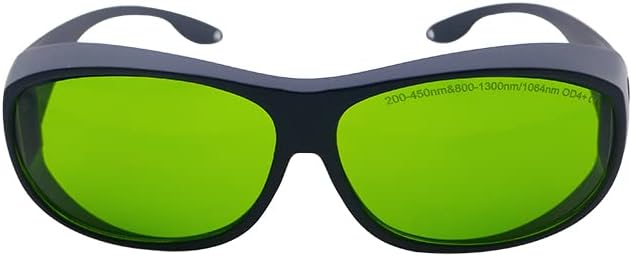
Ventilation System

Honeycomb or Blade Bed


Worth it once you're committed. These items meaningfully improve your experience and are often bought within the first few months.
Compressed Air Assist

Material Alignment Tools


Material choice determines what is possible and what is dangerous. Here is a practical reference for what the laser can and cannot safely work with:
| Material | Cut | Engrave | Result Quality | Safety Note |
|---|---|---|---|---|
| Basswood / Birch ply | Yes | Yes | Excellent — clean cuts, warm engraving tone | Ventilate normally — wood smoke only |
| MDF | Yes | Yes | Good cuts, darker engrave tone | Formaldehyde binders — strong ventilation required |
| Cast acrylic | Yes | Yes (frosted effect) | Excellent — flame-polished edges, crisp engraving | Ventilate — acrylic fumes are irritants |
| Extruded acrylic | Yes | Poor | Cuts well but engraving looks foggy not frosted | Same as cast acrylic |
| Leather (vegetable tan) | Yes | Yes | Very good — clean cuts, detailed engraving | Strong smell — good ventilation essential |
| Anodised aluminium | No (CO2) / No (diode) | Yes — removes anodising | Excellent contrast marking | Safe — minimal fumes from anodising removal |
| PVC / Vinyl | Never | Never | Do not attempt | Produces chlorine gas — genuinely dangerous |
| Polycarbonate | Avoid | Poor | Burns and discolours rather than cutting cleanly | Produces toxic fumes — use acrylic instead |
Interactive Buyer's Guide
Compare all tiers, track what you own, see your full budget.
How to Get Started Step by Step
Sort ventilation before your first cut
Every laser cutting operation produces smoke and fumes. Some materials produce fumes that are genuinely hazardous. A machine exhausting directly into a living space is a health risk, not an inconvenience. Ducting the exhaust to a window, an external vent, or through a HEPA and activated carbon filter is a non-negotiable first step. Do this before the machine is switched on for the first time.
Run a material test matrix before every new material
Power and speed settings that cut cleanly through 3mm basswood will char it at higher power, fail to cut it at lower power, and produce entirely different results on 3mm MDF, acrylic, or plywood. Running a test grid — a matrix of small squares at incrementally varied power and speed — on every new material batch before committing to a full job saves material and produces dramatically better results than guessing from a settings chart.
Learn to set focus correctly
A laser beam focused at the correct distance from the material surface produces the narrowest, most powerful spot and the cleanest cut. Too close or too far and the spot widens, cutting power drops, and edge quality deteriorates. Most machines include a focus tool. Some auto-focus. Understanding what correct focus looks like — and how to confirm it with a focus test — is as important as power and speed settings.
Design in vectors, engrave in raster
Laser software interprets thin vector lines as cut or score paths and filled areas as engrave regions. Designing in vector software — Inkscape is free, Adobe Illustrator is the professional standard — produces files that give you clean control over what the machine cuts versus engraves. Raster images, including photographs, are sent to the laser as greyscale data and converted into dot patterns the laser traces line by line. Understanding this distinction before starting saves significant confusion.
Never leave the machine unattended while cutting
Laser cutters can ignite materials. A cut that runs correctly one hundred times can produce a flame on the hundred and first if air assist fails, focus shifts, or an unusual grain in the material catches. Staying present during every job, with a fire extinguisher accessible and a clear path to the power switch, is not overcaution. It is the standard practice of every experienced laser operator regardless of how long they have been using the machine.
Build a material library from day one
Every time you dial in settings for a new material on your specific machine, record them — material type, thickness, supplier, power, speed, passes, and the result. A personal settings library removes the need to retest every material from scratch and becomes increasingly valuable as you work with more materials over time. Most experienced laser operators maintain these records in a simple spreadsheet and treat them as one of their most useful shop assets.
What to Expect From Your First Projects
Here's what typically happens when you start — and why it's useful information, not failure.
Settings will be wrong before they are right. The power and speed settings that produce a clean cut on one batch of 3mm basswood may not cut through the next batch from the same supplier if the wood density varies. The first sessions involve running test matrices, recording results, adjusting settings, and running more tests. This is not failure — it is the calibration process every laser operator goes through with every new material. Treating it as a learning phase rather than a troubleshooting emergency produces a much better experience.
The smell is significant and must be managed. Laser cutting produces a quantity of smoke and fumes that is completely unacceptable in an unventilated space. The smell embeds in fabric and is persistent. Operating without proper ventilation is both a health risk and a guaranteed complaint from everyone sharing the space. Sort this before the first cut, not after.
The first clean cut is immediately satisfying. There is a specific quality to a piece of wood or acrylic that has been laser cut — the precision of the edge, the slight texture of an engraved surface, the cleanliness of an interior cutout — that is different from anything produced by hand tools. That quality is present from the very first successful job and is part of why people who try laser cutting tend to stay with it.
Design takes longer than cutting. A file that takes four hours to design and prepare runs in twenty minutes on the machine. As skills develop, the ratio improves, but the design stage is always the larger investment of creative energy. Learning vector design software in parallel with machine operation is the investment that expands what is possible more than any equipment upgrade.
Lightburn will feel complex for the first week and then intuitive. Lightburn is powerful software with a lot of features. The learning curve is real but the community resources are excellent — there are tutorial libraries, active forums, and a YouTube channel maintained by the Lightburn team that covers every feature in accessible detail. Most beginners report feeling comfortable with the core workflow within the first two weeks of regular use.
Beginner Tips That Actually Help
Use air assist on every cut
Air assist directs a stream of compressed air at the laser focal point during cutting. It blows combustion gases away from the cut line, prevents flare-ups, keeps the lens clean, and produces noticeably cleaner cut edges by removing char before it can re-deposit on the kerf walls. Most modern machines include basic air assist. An upgraded air pump producing higher pressure improves results further on thicker materials and is one of the most cost-effective machine improvements available at $20 to $50.
Apply masking tape before engraving wood and leather
Engraving produces smoke residue that deposits on the surrounding material surface and is difficult to remove without damaging the finish. Applying low-tack masking tape to the surface before engraving, then peeling it off after the job, keeps the surrounding material clean and produces dramatically cleaner results with no additional effort. This technique is standard practice among experienced laser operators and is one of the most impactful workflow improvements a beginner can adopt immediately.
Understand kerf and account for it in designs
Kerf is the width of material the laser removes as it cuts. On most hobby machines cutting 3mm wood, kerf is approximately 0.1 to 0.2mm. For decorative projects this is irrelevant. For press-fit joinery — tabs and slots that hold pieces together without glue — kerf determines whether the joint is tight, loose, or correct. Running a kerf calibration test on each material and adjusting your design's joint tolerances accordingly is the difference between joinery that fits first time and joinery that requires force or falls apart.
Engrave photographs with a dithering algorithm, not greyscale
Lasers are binary devices — the beam is either on or off at a given point. Greyscale images converted directly to laser instructions produce muddy, low-contrast results because the machine cannot reproduce true grey tones. Dithering algorithms — Jarvis, Stucki, and Floyd-Steinberg are the most widely used — convert greyscale tonal values into patterns of dots at varying densities that the eye reads as continuous tone. Lightburn includes all major dithering algorithms. Choosing the right algorithm for the material is a skill that develops through experimentation, and the results achievable on wood and leather with well-converted photographs are genuinely striking.
Clean the lens and mirrors on a schedule
Smoke and debris deposit on the laser lens over time. A dirty lens scatters the beam, reduces cutting power, degrades engraving quality, and if severe enough, can crack the lens from heat absorption. Cleaning the lens with a lint-free optical cloth and isopropyl alcohol every five to ten hours of cutting time maintains consistent performance and extends lens life. Checking the lens before a long job costs thirty seconds and prevents the frustration of a long run producing poor results from a cause that was entirely preventable.
Join Lightburn and machine-specific communities online
The Lightburn forum and the subreddits for specific machines contain documented solutions to virtually every problem a beginner encounters. The laser community online is notably collaborative — settings databases, material test results, design files, and troubleshooting guides are shared freely. Makers Muse, Laser Everything, and Russ Sadler's channel on YouTube cover technique and machine modification at a level of depth that significantly accelerates understanding of how the equipment actually works and how to get the most from it.
Common Questions Answered
- What is the difference between cutting and engraving, and can one machine do both?
Cutting passes the laser through the material completely to separate pieces. Engraving passes the laser across the surface to remove material to a shallow depth, producing texture, imagery, or lettering. Every laser machine does both — the distinction is purely one of settings. Cutting uses slower speeds and higher power to penetrate the material fully. Engraving uses faster speeds and lower power to remove only the surface. In Lightburn, cut lines are typically assigned as vector paths and engraving regions as filled shapes or raster images, and the software sends each to the machine with the appropriate settings.
- Can a laser cutter work with metal?
CO2 lasers can mark metal using a coating compound called Cermark or LaserBond, which bonds to the metal surface under laser heat to produce a permanent black mark. Without such a coating, CO2 lasers cannot mark most bare metals. Diode lasers can mark anodised aluminium by removing the anodised layer, revealing the bare metal beneath. Fibre lasers are the correct tool for bare metal marking and cutting and operate at a wavelength that metals absorb efficiently. Cutting through metal sheet requires either a fibre laser of substantial power — well above hobby machine specifications — or dedicated metal cutting equipment.
- How dangerous are the fumes produced by laser cutting?
The danger varies enormously by material. Wood and leather produce smoke that is an irritant and unpleasant but not acutely toxic at hobby volumes with adequate ventilation. MDF releases formaldehyde from its binders and requires stronger ventilation than solid wood. Acrylic produces methyl methacrylate fumes that are irritating and require ventilation. PVC and polycarbonate produce genuinely hazardous fumes — chlorine gas from PVC and bisphenol compounds from polycarbonate — and must never be lasered under any circumstances. Operating with adequate ventilation on approved materials makes laser cutting safe at hobby scale. The material safety data sheet for any unfamiliar material should be reviewed before cutting.
- What software do you need to design for a laser cutter?
The two-software workflow used by most laser operators is a design application and a laser control application. For design, Inkscape is free and capable for vector work. Adobe Illustrator is the professional standard. Canva produces acceptable vector exports for simple designs. For laser control, Lightburn is the near-universal recommendation regardless of machine — it handles both the design refinement and the machine communication, supports almost every machine on the market, and has a tutorial library and active community that make it learnable without prior CAD or design experience.
- What can you realistically make and sell with a hobby laser cutter?
The laser cutting hobbyist-to-seller pipeline is well established. Personalised gifts — engraved cutting boards, custom signs, name plaques, ornaments — sell consistently on Etsy and at craft markets because laser personalisation is fast, precise, and perceived as high-value relative to its production cost. Wooden jewellery, acrylic keychains, wedding stationery elements, and custom leather goods are other established categories. The constraint is not the machine but the design library and the willingness to build an audience. Makers who treat the business side with the same seriousness as the craft side report that a quality laser setup can generate meaningful supplementary income within the first year.
- How much does it cost to run a laser cutter per hour?
Running costs are low once the machine is paid for. A diode laser consumes 50 to 100 watts during operation, making electricity costs negligible at typical rates. A CO2 laser consuming 300 to 500 watts adds a few cents per hour. The main ongoing costs are materials and laser tube replacement for CO2 machines — CO2 tubes last 2,000 to 8,000 hours depending on the tube quality and operating conditions, and replacement tubes cost $80 to $300. Diode laser modules degrade over thousands of hours and replacement modules cost $50 to $150. For most hobby users, these maintenance costs spread over years of use represent a very low ongoing expense relative to what the machine produces.